Closed won should mean finance-ready: how to catch deal errors in HubSpot
When a deal reaches finance it is already closed won, and it may already be wrong. Here is how to catch deal errors in HubSpot before they hit the ERP: fields per stage, format rules, a readiness check and, for complex deals, a finance approval stage.
 Zhenya Bankouski
Share article

A deal should only reach closed won when finance can invoice it without fixing anything. In HubSpot you get there by collecting the finance fields stage by stage, checking their format, running a readiness check before the deal leaves the CRM and, where deals are complex, letting finance make the final move to closed won.
Most teams do none of this. The deal closes, it is pushed to the ERP the same minute, and whatever is wrong gets fixed there.
When finance fixes the deal, HubSpot stops being the truth
On a recent client project I asked the finance team a simple question. Who verifies a deal when it leaves sales, and can it be rejected if the data is not complete? The answer was that nobody verifies it in the CRM. The deal is closed won, it syncs to the ERP, and finance corrects the mistakes there. Nobody goes back to HubSpot.
That feels efficient, because finance gets a correct invoice out. The cost shows up later, and it lands on the CFO and the CRO at the same time.
- The CRM and the ERP now hold two versions of the same contract. ARR in HubSpot does not match what is invoiced, so every board number needs a reconciliation first. If you report ARR from HubSpot, as we describe in our guide to ARR reporting with custom snapshots, the snapshot is only as good as the closed won data under it.
- Renewals inherit the error. A renewal created from a wrong billing entity, payment term or VAT number carries the same mistake into next year, and finance fixes it again.
- Month end becomes a clean-up exercise. The more deals close on the last day, the more corrections pile up in the ERP.
This is a data problem before it is a finance problem. In our survey of 123 RevOps practitioners at mid-market B2B SaaS companies, 73% have an AI mandate and only 38% have the data to support it (Revenue Wizards, RevOps in 2026). Contract and billing data that lives correctly in the ERP and incorrectly in the CRM is one of the most common places that gap shows up.
If you suspect your HubSpot deals and your invoices have already drifted apart, our CRM and GTM Health Check measures how far and fixes the first gap.
Two ways to put a gate in front of closed won
You want to catch these deals before they hit any finance system. There are two designs that work in HubSpot, and the right one depends on how complex your deals are.
A finance approval stage
The stricter version is a deal desk. Finance sits earlier in the funnel, in legal review or contracting, and looks at the deal in HubSpot while it can still be fixed. In the pipeline it is as simple as a stage called Finance approval between contracting and closed won. The rep can push the deal to approval and no further. Someone from finance does the final push to closed won, or sends it back with a note saying what is missing.
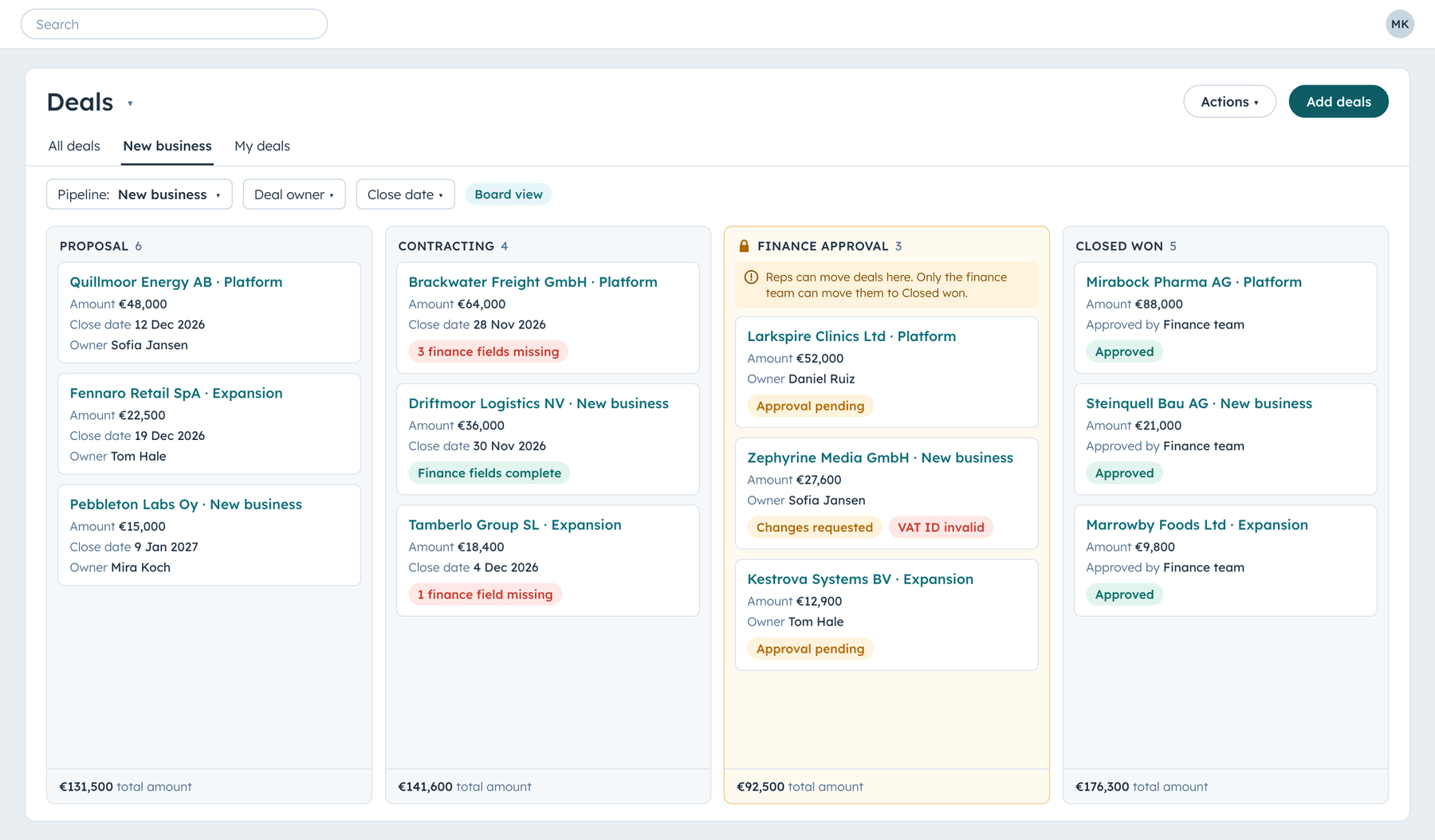
HubSpot supports this natively. With Sales Hub Enterprise you can require approvals for deals in a pipeline. Turning it on adds an approval stage, you choose which deals need approval with criteria, and you pick up to 30 approvers, where either one or all of them must approve. You do not need an agent for this. It is human oversight, and a person in finance can do it well. You can still use an agent to prepare the deal for approval as much as you want.
In an SMB motion this would be overkill, because deals are small, standard and fast. In an enterprise motion with complex contracts, we see more success with a deal desk, because there is a pair of eyes that is less biased towards closing the deal as fast as possible.
Required fields and checks at closed won
The pushback is always the same. Finance becomes the bottleneck at month end, when a lot of deals close on the last day.
Some finance leaders prefer a lighter version, and it is a valid choice. There is no approval in the CRM. Instead, the finance fields are required at closed won, their format is validated, and a readiness check runs on every open deal so gaps are visible long before the close. Sales fills the gaps, and finance does not touch the deal. It trades the second pair of eyes for speed, so it only works if the rest of this article is in place.
Both designs depend on the same groundwork.
Spread the finance fields across the deal stages
If every finance field is required at the very last moment, reps get hit with twenty fields to close a deal and start typing whatever gets them through. Ask for each field at the stage where the rep actually knows it.
HubSpot calls this conditional stage properties. For each stage you choose which properties appear, and which are required, when a user moves a deal into it. A typical split for a B2B contract looks like this.
| Stage | What the rep knows by then | Required when the deal enters the stage |
|---|---|---|
| Proposal | Who signs and how they pay | Selling entity, invoice frequency, payment term |
| Contracting | The legal and billing details from the order form | VAT ID, billing address, billing contact email, PO required, contract start date |
| Closed won | The signed contract | Buyer signing date, contract end date, auto renewal |
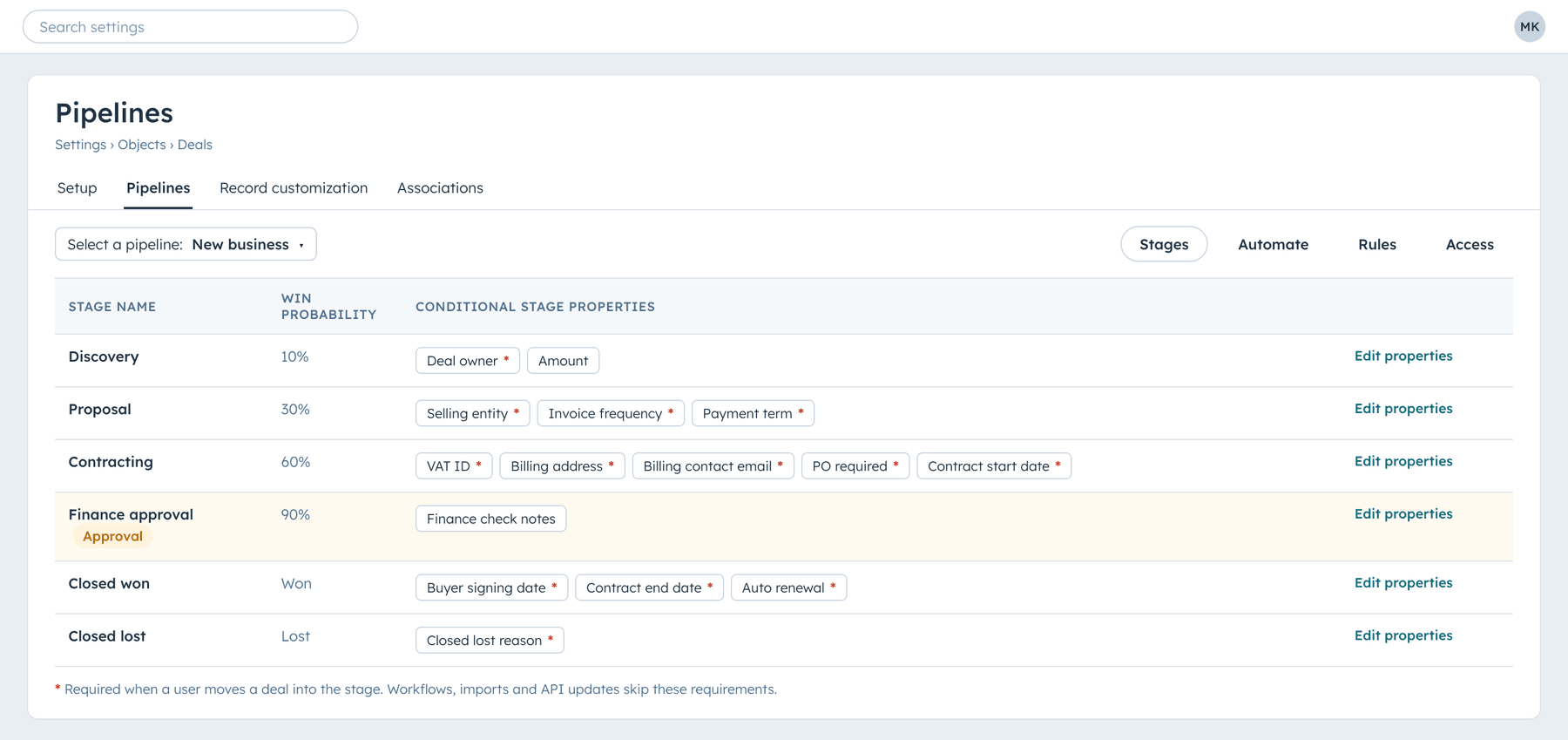
The Five Dots knowledge base, our RevOps methodology library, makes the same point about CRM data hygiene. Tie required fields to stage exit criteria so data completes as the deal progresses, and keep the list to the fields decisions depend on, because too many required fields produce garbage answers. Start from the fields your ERP actually needs to create a customer and an invoice. Your finance team usually has that list already, often as the fields that make the sync fail.
One caveat matters for the design. Stage requirements apply to people moving deals in HubSpot. Workflows, imports and integrations that move a deal through the API skip them, which is why the readiness check further down exists.
Check the format, not just that a field is filled
A required field only proves that something was typed. "TBD" counts as filled, and so does a VAT number with spaces, dots and no country code.
HubSpot lets you set validation rules on properties in every plan, and with Professional or Enterprise you can validate a text property with a regular expression. For a VAT ID that means capitals and digits only, no spaces, and a clear message telling the rep what a valid value looks like.
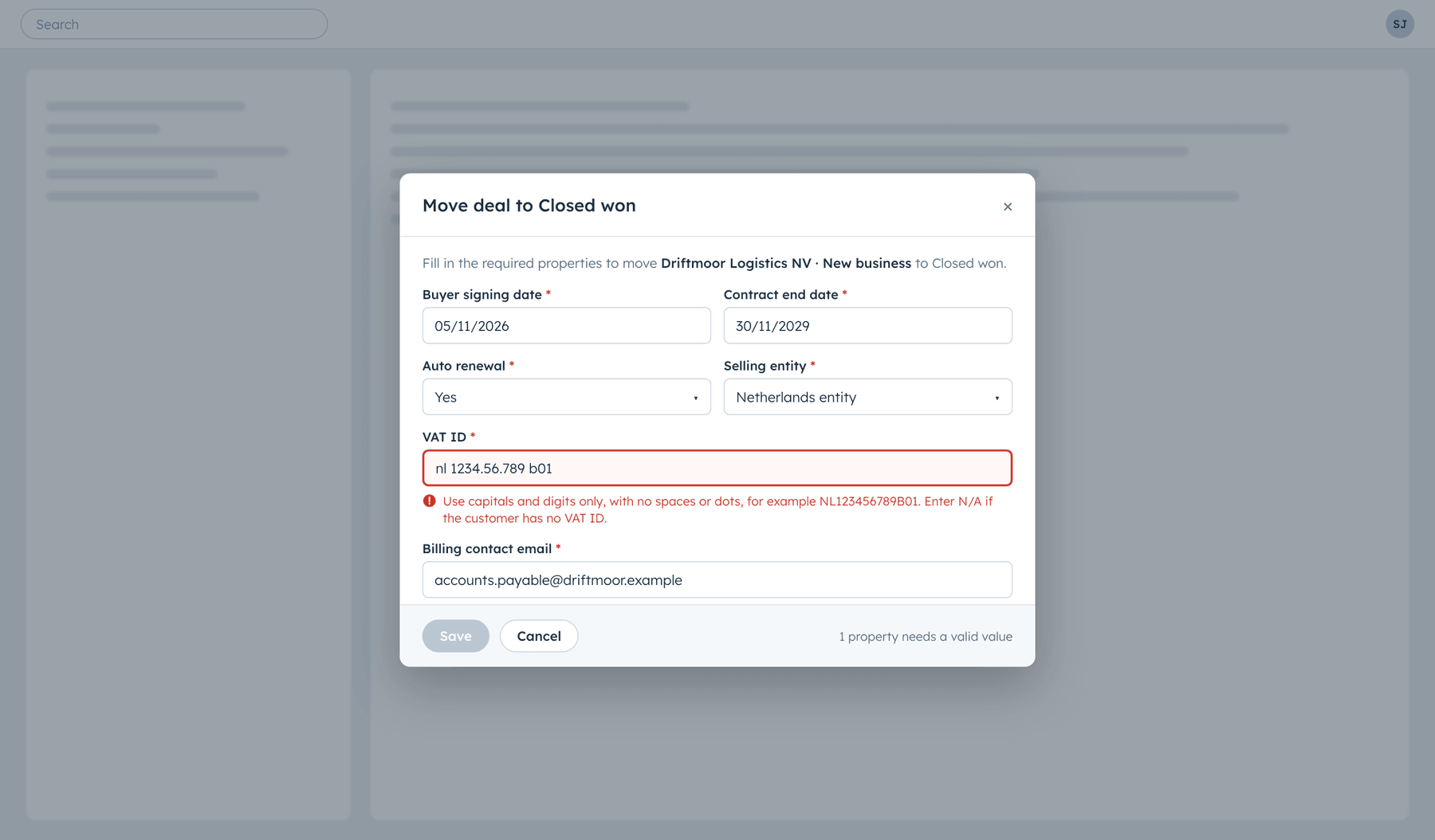
Test this before you switch it on in production. In our tests the format rule also rejected writes from integrations, and when one value in an update is invalid, HubSpot rejects the whole update, so a correct billing city sent in the same call was not saved either. On one project, about half of the VAT values a quoting integration had written in the previous month would have failed the new rule. We moved the strict rule onto a VAT field that only people and our own workflows write, and added a workflow that cleans the value the integration sends and copies it across.
Do not make reps type what you already know
The fastest way to get complete data is to fill it before the rep has to. Billing entity, billing contact, payment term and VAT rarely change between a contract and its renewal.
When a renewal is created, a workflow can copy the finance fields from the deal it renews and fill only the empty ones, never overwriting what a person entered. The rep confirms instead of retyping. This is also where most of the value of a clean CRM database design shows up, because inheritance only works when each renewal knows which deal it came from.
Run a readiness check before anything is pushed
Required fields and format rules stop people. A readiness check catches everything else, including deals moved by workflows and integrations.
Take the list of checks your finance team runs when a deal arrives in the ERP and run them in HubSpot instead. A workflow with custom code checks each open deal and writes the result on the record: passed or failed, how many checks failed, and which ones. It runs again whenever one of the fields changes. A list of failing deals gives the deal owner and finance one place to look, weeks before the month-end close.
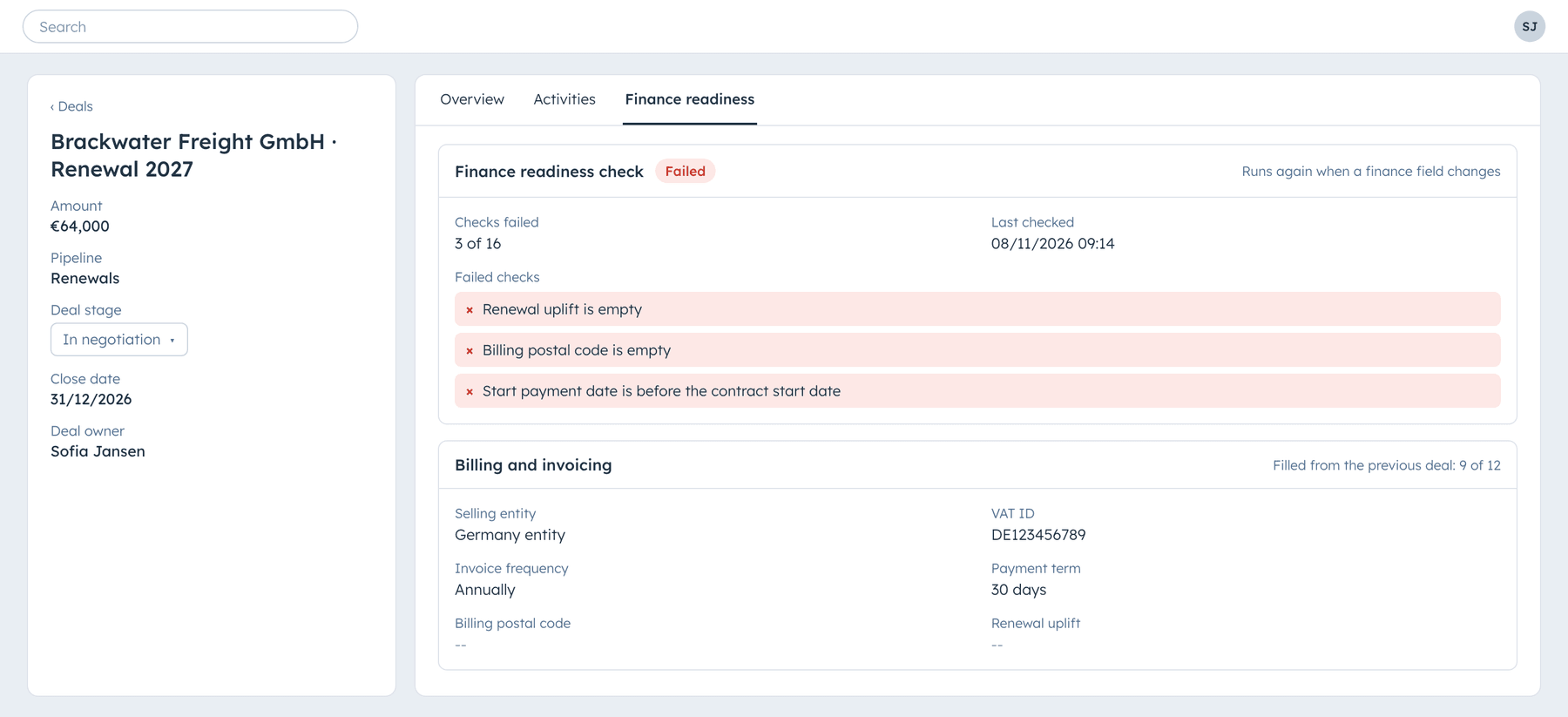
The first run is usually sobering. When we switched this on for a client's open renewals, a large share failed, mostly on renewal uplift, start dates and parts of the billing address. That is the work finance had been doing by hand in the ERP, now visible in the CRM while the deal owner can still fix it.
This is also the split between commercial and financial operations we describe in commercial RevOps versus financial revenue operations. Sales owns the deal data, finance owns the rules, and the CRM enforces them.
Register closed won, hold the commission
Nobody stops you from registering closed won in the quarter. The deal can count for the forecast and the board. The commission release just waits until the data is there.
It is carrot and stick for people who are not incentivised to give you good data. Reps are paid to close, so complete billing data is somebody else's problem until it touches their pay. The Five Dots knowledge base describes the same idea as a per-rep data quality score tied to commission. A simple version is a calculated field that counts missing finance fields, and a commission rule that pays out when it reaches zero.
Lock the deals finance has acted on
Once finance has invoiced a deal or terminated a subscription, the deal in HubSpot should stop moving. HubSpot's pipeline rules let you restrict moving deals backwards and limit who can edit deals in certain stages, for example closed won and closed lost to Super Admins only. For cancellations we add one more step: once a deal is closed lost with a termination date, a workflow puts back the stage and the date if anything changes them and tells the owner, because finance has already acted on that date.
Fix it in HubSpot or fix it again next year
Every correction that happens only in the ERP comes back. The renewal is created from the old data, the upsell is added to the wrong contract, and the board deck shows a number finance cannot reconcile. If you do not fix it in HubSpot, you will be fixing the same issue one year from now.
If you want to know which of these gaps costs you most today, our CRM and GTM Health Check reviews your pipeline stages, required fields and the data that reaches finance, and fixes the first one with you.
Frequently asked questions
What does closed won mean?
Closed won is the deal stage that records a signed customer, the point where a deal stops being pipeline and becomes revenue. In a healthy setup it also means the deal is complete enough for finance to invoice it without corrections.
Should finance approve every deal before closed won?
No, only where deals are complex enough to justify it. Standard, small deals move faster with required fields, format rules and a readiness check. Enterprise deals with custom terms, multiple entities or non-standard billing benefit from a finance approval stage, often limited by criteria such as deal size or contract type.
Does HubSpot have a deal approval process?
Yes. With Sales Hub Enterprise you can turn on an approval process per deal pipeline. It adds an approval stage, lets you set which deals need approval and assigns up to 30 approvers. Turning the approval process off again cannot be undone, so test it in a sandbox first.
Do required stage properties apply to workflows and integrations?
No. Conditional stage properties apply when a user creates a deal in a stage or moves it there in HubSpot. Deals moved by workflows, imports or the API skip them, so pair them with a readiness check that runs on every deal.
How many fields should a rep fill to close a deal?
As few as possible at the last stage. Ask for each finance field at the stage where the rep knows it, inherit what you already have from earlier deals, and leave only the signing details for closed won.
What if finance becomes the bottleneck at month end?
Move the review earlier. If the fields are collected stage by stage and the readiness check runs on every open deal, finance sees the gaps weeks before the close, and the last-day approval only confirms what is already clean.